A website redesign should bring in more leads, not fewer. Yet many businesses launch a beautiful new site and then watch their search traffic slide, because important pages, links and settings were lost along the way.
This website redesign checklist covers what to do before, during and after launch to protect your rankings and improve conversions. It reflects the process web design agency Twastia.io follows on redesign projects, written so you can use it with any designer or platform.
Before You Redesign: Know Why You Are Doing It
“It looks dated” is a valid reason, but it should not be the only one. Write down the specific problems the new site must solve, so every design decision has something to measure against.
- Visitors cannot find key services or information quickly.
- The site is slow or difficult to use on phones.
- Forms and calls to action are buried or confusing.
- The brand or offer has changed and the site no longer reflects it.
- The current platform is hard for your team to update.
Phase 1: Benchmark and Audit the Current Site
You cannot prove a redesign worked without a starting point. Capture your current performance before anything changes.
Record Your Baseline Data
Export key numbers from Google Analytics and Google Search Console: organic traffic, top landing pages, conversions and the search queries that bring visitors in. Save a few months of data so seasonal swings do not mislead you later.
Crawl Every URL
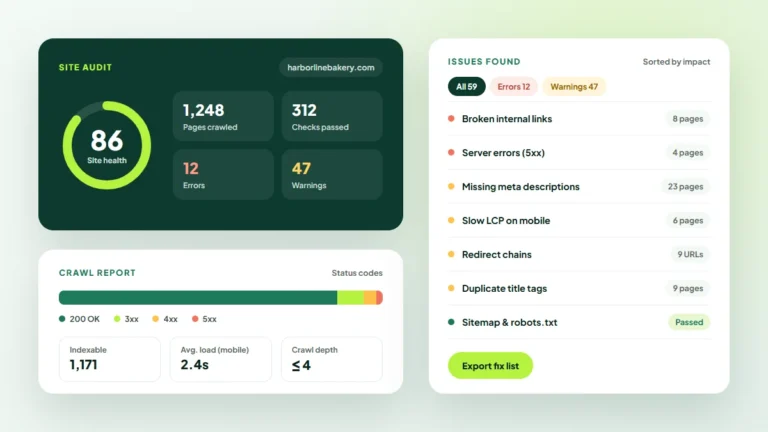
Use a crawler or your CMS to export a full list of URLs, including pages, posts, images and PDFs. This list becomes the backbone of your redirect plan.
Identify Your Most Valuable Pages
Flag pages that earn organic traffic, attract backlinks or generate leads. These pages need the most care, and their content should only change with a clear reason.
Phase 2: Plan Structure and Content
Design comes after structure. Decide how the site will be organized and what each page needs to say before anyone opens a design tool.
This is also the right moment to confirm your brand assets. Gather approved logos, colors, fonts and photos now, so the design team is not waiting on files halfway through the build.
- Map the new sitemap. Group services logically and keep important pages within a few clicks of the homepage.
- Match old pages to new ones. For every existing URL, decide whether it stays, merges into another page or is retired.
- Keep URLs where you can. Unchanged URLs are the simplest way to protect existing rankings.
- Plan page content. Keep the topics and keywords that already perform, and improve thin or outdated copy.
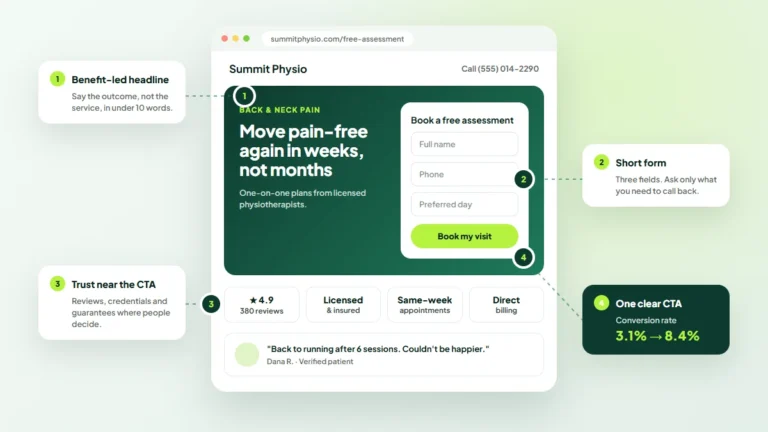
- Define a conversion goal for each page. Decide what you want visitors to do next and where that call to action will sit.
For pages built around a single action, follow our landing page best practices.
Phase 3: Design and Build With Performance in Mind
Mobile-First Layouts
Design for the smallest screen first, then expand. Check that text is easy to read, buttons are easy to tap and forms are short enough to complete on a phone.
Speed From the Start
Speed is easier to build in than to bolt on later. Use properly sized and compressed images, limit heavy scripts and plugins, and set up caching before launch.
Accessibility Basics
Good contrast, readable font sizes, descriptive link text, keyboard-friendly navigation and alt text on meaningful images make your site usable for more people. Many of these choices also help search engines understand your content.
On-Page SEO Carried Over
Make sure every page keeps a unique title tag, meta description and a single H1. Our on-page SEO checklist explains how to set these up properly if you are building pages yourself.
Phase 4: Pre-Launch Checklist
Test everything on a staging site before it goes live. These are the checks that most often get missed.
- 301 redirects: every old URL that changes points to its most relevant new page, not just the homepage.
- Internal links: links throughout the site point to the new URLs directly, without redirect chains.
- Forms: submit every form and confirm the messages arrive where they should.
- Tracking: analytics, conversion events and ad tags fire correctly on the new templates.
- Indexing settings: the “discourage search engines” option or noindex tags used on staging are removed for launch.
- Robots.txt and XML sitemap: both are correct and the sitemap lists only live, indexable pages.
- Cross-device testing: pages work in common browsers and on real phones and tablets.
- Structured data: any schema markup from the old site is carried over or improved.
Google’s documentation on redirects and Google Search explains which redirect types to use and why.
Phase 5: Launch Day and the Weeks After
Choose a launch time when traffic is usually lower and your team is available to fix issues. Avoid launching right before a holiday or a major campaign.
Once live, submit the new XML sitemap in Google Search Console and test a sample of old URLs to confirm redirects work. Then monitor closely for several weeks.
- Watch Search Console for crawl errors, pages not indexed and sudden drops in impressions.
- Compare organic traffic and conversions with your baseline.
- Check for 404 errors and add missing redirects quickly.
- Collect feedback from customers and staff about anything confusing.
Some ranking movement is normal while search engines process the changes. A steady, lasting decline is the signal to investigate redirects, missing content and technical settings.
Website Redesign Mistakes to Avoid
- Deleting pages that ranked well because they did not fit the new design.
- Redirecting every old URL to the homepage.
- Launching with staging settings that block search engines.
- Forgetting to reinstall tracking, so results cannot be compared.
- Choosing style over clarity, with vague headlines and hidden calls to action.
Key Takeaways
- Set clear goals and benchmark performance before changing anything.
- Plan structure, content and redirects before design begins.
- Build mobile-first, fast and accessible from day one.
- Test redirects, forms, tracking and indexing settings before launch.
- Monitor closely after launch and fix issues quickly.
Our web design guides cover layout, speed and conversion in more depth.
Plan a Redesign That Pays Off
A redesign is one of the biggest marketing investments a small business makes, so it deserves a careful plan. To see how Twastia.io designs fast, conversion-focused websites with SEO built in, visit our web design services.
Thinking about a new site but unsure where to start? Request a free growth audit, and Twastia.io will review your current website, flag the pages worth protecting and outline what a redesign should fix first.