
Most small business websites do not have a ranking problem. They have a clarity problem: pages that never tell Google, or the reader, exactly what they are about. On-page SEO fixes that, and it is the part of search engine optimization you control completely.
This on-page SEO checklist walks through the fixes we look at first when Twastia.io reviews a page. Work through it one page at a time, starting with the pages that already bring in leads or sales.
Before You Start: One Page, One Search Intent
Every page should target one main topic and the intent behind it. Someone searching “emergency plumber near me” wants a phone number now, while someone searching “how to fix a leaking tap” wants instructions. Trying to serve both on one page usually means serving neither well.
Pick a focus keyword for each page, plus a handful of close variations. Then search for it yourself and study the pages that already rank. If the results are all guides, a sales page will struggle; if they are all service pages, a long article will too.
Google’s own SEO Starter Guide is a helpful companion to this checklist.
The On-Page SEO Checklist
Use these twelve checks as a repeatable routine. You do not need special software for most of them, just your CMS, a browser and a little patience.
1. Write a Title Tag That Earns the Click
The title tag is the blue headline people see in search results. Put the main keyword near the start, describe the benefit clearly and add your brand at the end if space allows.
As a rule of thumb, keep titles to roughly 60 characters so they are less likely to be cut off. Every page on your site should have a unique title.
2. Use a Meta Description That Sells the Visit
Meta descriptions do not directly change rankings, but they shape whether someone clicks. Summarize what the page offers, include the keyword naturally and end with a reason to visit. Aim for one or two tight sentences.
3. Keep One Clear H1
Your H1 is the on-page headline. It should match the promise of your title tag, contain the main topic and appear once per page. Use H2s for main sections and H3s for points inside them, so the structure reads like a clean outline.
4. Answer the Query Early
Readers decide quickly whether they are in the right place. State what the page covers and who it is for in the first paragraph, and mention your main keyword there naturally. Save the background story for later.
5. Cover the Topic Completely, Not Endlessly
Good content answers the follow-up questions a searcher is likely to have. Look at the “People also ask” box and related searches for ideas, then address the ones that genuinely matter to your customers.
Length is a result of usefulness, not a target. Cut anything that does not help the reader take the next step.
6. Make URLs Short and Descriptive
A clean URL like /services/roof-repair/ is easier to read, share and understand than a string of numbers. Use lowercase words separated by hyphens and drop filler words. If you change an existing URL, set up a 301 redirect from the old one.
7. Add Purposeful Internal Links
Internal links help search engines discover pages and understand how they relate. They also guide visitors to the next logical step, such as a service page or a contact form.
- Link from high-traffic pages to the pages you most want to rank.
- Use descriptive anchor text, not “click here.”
- Make sure every important page is reachable within a few clicks of the homepage.
- Fix or remove internal links that point to deleted pages.
8. Optimize Images for Speed and Meaning
Large images are one of the most common reasons pages load slowly. Resize images to the size they actually display, compress them and use modern formats such as WebP where your platform supports it.
Give each meaningful image a short, descriptive alt text. Write it for someone who cannot see the image, and include a keyword only when it describes the picture honestly.
9. Check Mobile Usability
Google primarily uses the mobile version of your site for indexing and ranking. Open the page on your phone and check that text is readable without zooming, buttons are easy to tap and nothing spills off the screen.
10. Improve Page Speed and Core Web Vitals
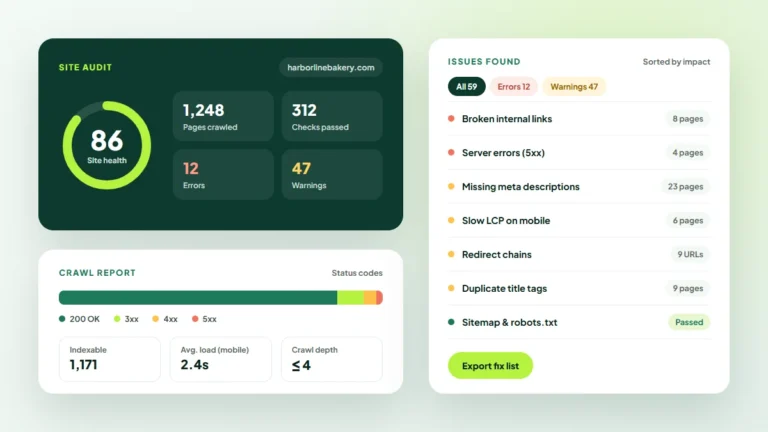
Core Web Vitals measure loading, responsiveness and visual stability. You can check them for free in Google Search Console and PageSpeed Insights.
Common fixes include lighter images, fewer plugins, caching and removing scripts you no longer use. Our guide to redesigning a website without losing rankings goes deeper on building fast, stable pages.
11. Add Structured Data Where It Fits
Schema markup helps search engines understand specific details such as your business type, products, reviews or FAQs. It can make a page eligible for richer search listings, though Google decides when to show them. Only mark up content that is actually visible on the page.
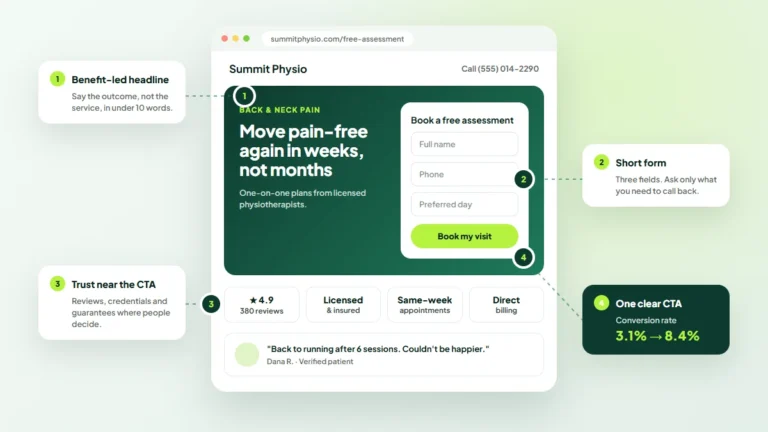
12. Include a Clear Next Step
Ranking is only useful if visitors act. Every page should have one primary call to action, whether that is calling, booking, buying or reading a related guide. Place it where a reader naturally finishes a section, not only at the very bottom.
How to Prioritize Your On-Page SEO Work
If your site has dozens of pages, you cannot fix everything this week. Start where the effort is most likely to pay off.
- Money pages first: service, product and location pages that lead directly to revenue.
- Near-miss pages next: pages ranking on page two in Search Console, where small improvements can make a visible difference.
- High-traffic articles: blog posts with steady visits but weak links to your services.
- Everything else: tidy up older pages during your regular content reviews.
Keep a simple spreadsheet with the page URL, focus keyword, date updated and what you changed. That log makes it far easier to connect your edits with later changes in traffic.
Common On-Page SEO Mistakes to Avoid
- Keyword stuffing: repeating the same phrase unnaturally makes pages harder to read and can work against you.
- Duplicate titles: templates that give every page the same title confuse searchers and search engines.
- Thin service pages: a two-line description rarely convinces anyone to call.
- Competing pages: several pages targeting the same keyword can split your signals. Merge or differentiate them.
- Set-and-forget: pages drift out of date. Review your key pages at least a few times a year.
Key Takeaways
- Give every page one focus keyword and one clear search intent.
- Get the basics right: unique title, helpful meta description, one H1 and a logical heading structure.
- Use internal links, fast images and mobile-friendly layouts to support both users and search engines.
- Prioritize the pages closest to revenue, and track every change you make.
For more on keyword research, content and technical fixes, browse our search engine optimization guides.
Want a Second Pair of Eyes on Your Pages?
On-page SEO is a habit, not a one-time project, and it works best alongside a regular technical SEO audit and helpful content. If you would rather hand it to specialists, explore the Twastia.io SEO services to see how we approach audits, keyword research and on-page optimization.
Not sure where your site stands today? Request a free growth audit and the Twastia.io team will point out the on-page fixes most likely to move your rankings and leads, with no obligation.