Every Google Ads account pays for some clicks that were never going to become customers. A plumber’s ad shows for “plumber salary,” or a premium service appears for searches that include “free.” Each click looks small, but together they can drain a budget fast.
Negative keywords are how you stop that waste. This guide from the Twastia.io team explains how they work, where to find them and how to manage them, so more of your budget reaches people who are ready to buy.
What Negative Keywords Do
A negative keyword tells Google not to show your ad when a search contains a particular word or phrase. If you add “jobs” as a negative, your ad will not appear for searches like “marketing jobs near me.”
Negatives do not raise your bids or improve your ads directly. They filter out irrelevant searches, so a higher share of your clicks comes from potential customers. Google’s help page about negative keywords covers the full rules.
How Negative Keyword Match Types Work
Negative keywords use match types too, but they behave differently from regular keywords. The key difference is that negatives do not automatically include close variations such as plurals or misspellings.
- Negative broad match: blocks searches that contain all of your negative words, in any order.
- Negative phrase match: blocks searches that contain the exact phrase, in the same order, even with other words around it.
- Negative exact match: blocks only searches that match the term exactly, with no extra words.
Because variations are not covered, add plurals and common misspellings yourself when they matter. For example, add both “job” and “jobs.”
Where to Find Negative Keywords
Start With a Pre-Launch List
You can predict many irrelevant searches before a campaign goes live. Common categories include:
- Employment terms: jobs, careers, hiring, salary, internship.
- Learning terms: course, training, tutorial, DIY, when you only sell the service.
- Bargain intent: free, cheap, if those buyers rarely fit your business.
- Services, products and locations you do not offer.
- Competitor names, if you have decided not to bid on them.
Mine the Search Terms Report
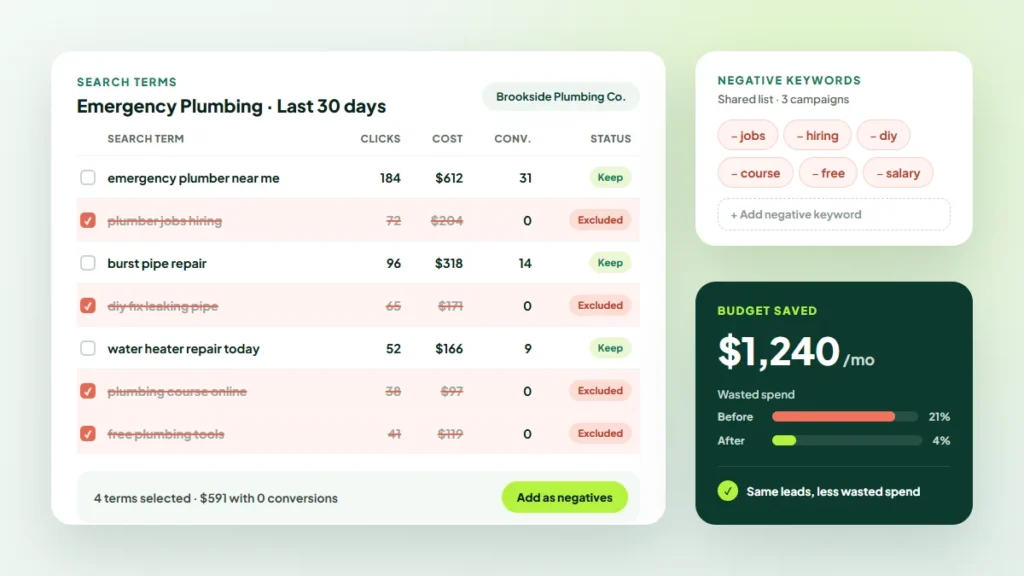
The search terms report shows the actual searches that triggered your ads, which makes it the best source of new negatives. Google’s guide to the search terms report explains how to open and filter it.
Sort by cost and look for terms with spend but no conversions. Ask one question for each: would someone searching this ever become a customer? If the answer is no, add a negative.
The same report also shows how customers describe their problems. Those questions can feed a content calendar built for lead generation.
Where to Add Negative Keywords
Negatives can sit at different levels, and choosing the right one keeps the account tidy.
- Shared negative keyword lists: terms that should never trigger any ad, such as “jobs,” applied across campaigns.
- Campaign level: terms that do not fit a specific service or location.
- Ad group level: terms that steer searches to the best-matching ad group, so they see the right ad and page.
That last technique works best when campaigns are already well organized. Our guide to Google Ads account structure for lead generation shows how to set that up.
Common Negative Keyword Mistakes
- Blocking good traffic: a negative like “cost” could block buyers comparing prices. Check what a term blocks before adding it.
- Forgetting variations: adding “repair” but not “repairs” leaves gaps.
- Setting and forgetting: new irrelevant searches appear all the time, especially with broad match.
- Conflicting negatives: a negative that matches one of your own keywords stops that keyword from showing. Review your lists for these conflicts.
Build a Simple Review Routine
Negative keyword management is ongoing. A short, regular routine beats an occasional deep clean.
- Review search terms weekly for new or high-spend campaigns.
- Move to every two weeks or monthly once a campaign is stable.
- Note why you added each negative, so others can follow your reasoning.
- Recheck shared lists when you add new services or locations.
Frequently Asked Questions
How many negative keywords should I have?
There is no ideal number. Add negatives based on real search terms and clear mismatches, not guesswork, and focus on terms that are actually costing money.
Do negative keywords work with Performance Max?
The options for Performance Max differ from Search campaigns and have changed over time. Check the current settings in your account or in Google Ads Help before relying on them.
Can negative keywords lower my costs?
They can reduce wasted spend on irrelevant clicks, which often improves cost per lead. They will not fix weak ads, landing pages or offers on their own.
For more on budgets, bidding and tracking, browse our Google Ads guides.
Make Every Click Count
Negative keywords are one of the simplest ways to make a budget work harder. If you would rather have specialists manage them alongside bidding and ad testing, explore the Google Ads management services at Twastia.io.
Wondering how much of your budget goes to irrelevant searches? Request a free growth audit, and Twastia.io will review your search terms, negative lists and campaign settings, then show you where to tighten up.