
A messy Google Ads account makes everything harder. Budgets leak into the wrong searches, reports become impossible to read and you cannot tell which services actually produce leads.
A clean Google Ads account structure fixes that before you spend another dollar. This guide shows how Twastia.io approaches account structure for lead generation, so you can build or rebuild yours with confidence.
How a Google Ads Account Is Organized
Every account follows the same hierarchy. Understanding it is the key to controlling where your money goes.
- Account: your billing, users and account-wide conversion settings.
- Campaigns: where you set budget, bidding strategy, locations, languages and networks.
- Ad groups: clusters of closely related keywords that share the same ads.
- Keywords and ads: the searches you want to appear for and the messages people see.
The golden rule is simple. Anything you want to control separately, such as budget or location, needs its own campaign. Anything that needs a different message needs its own ad group.
Step 1: Set Up Conversion Tracking First
Structure only matters if you can measure results. Before launching, decide what counts as a lead and track it inside Google Ads.
For most service businesses, that means form submissions, phone calls from ads, calls from your website and booking confirmations. Mark the actions that represent real leads as primary conversions, so automated bidding optimizes toward them rather than toward page views.
Step 2: Split Campaigns by What You Sell
The most useful lead generation structure usually mirrors your services. If you are a home services company, roof repair, gutter installation and emergency leak calls each deserve their own campaign.
This gives you separate budgets for services with different profit margins. It also makes reports instantly readable: you can see the cost per lead for each service at a glance.
When to Split by Location
If you serve several cities or regions with different demand or pricing, consider separate campaigns per location. Only do this when the difference matters; splitting too far spreads your budget and data thin.
Keep Brand Searches Separate
People searching your business name are already looking for you. Put those keywords in their own brand campaign with a modest budget, so they do not inflate the results of your non-brand campaigns and hide what new customer acquisition really costs.
Step 3: Build Tight, Themed Ad Groups
Inside each campaign, group keywords by the specific need behind them. A roof repair campaign might have ad groups for leak repair, storm damage and roof inspection.
Each ad group should hold keywords close enough that a single ad speaks to all of them. If you find yourself writing an ad that has to cover three different things, split the group.
Choose Match Types Deliberately
Match types control how closely a search must match your keyword. Exact match is the tightest, phrase match allows more variation and broad match reaches the widest range of related searches.
Google’s overview of keyword matching options explains each type in detail.
A practical starting point for smaller budgets is phrase and exact match on high-intent keywords. Broad match can work well later, once conversion tracking is reliable and smart bidding has data to learn from.
Step 4: Add Negative Keywords From Day One
Negative keywords stop your ads from showing for searches you do not want. For lead generation, they are one of the simplest ways to cut wasted spend.
- Job seekers: “jobs,” “careers,” “salary,” “hiring.”
- Do-it-yourself research: “how to,” “DIY,” “tutorial,” when you only sell the service.
- Free or cheap intent: “free,” “cheap,” if those buyers rarely become good customers.
- Services you do not offer and locations you do not serve.
Keep a shared negative keyword list at the account level for terms that apply everywhere. Then review the search terms report every week or two and keep adding to it. Our guide to Google Ads negative keywords covers match types and review routines in more depth.
Step 5: Write Ads for Each Ad Group
Responsive search ads let you add up to 15 headlines and four descriptions, and Google tests the combinations. Use that space well: include the core keyword, your main benefit, proof points you can genuinely back up and a clear call to action.
Add assets such as sitelinks, callouts and call assets. They make your ad larger and give searchers more ways to contact you directly.
Match Every Ad Group to a Landing Page
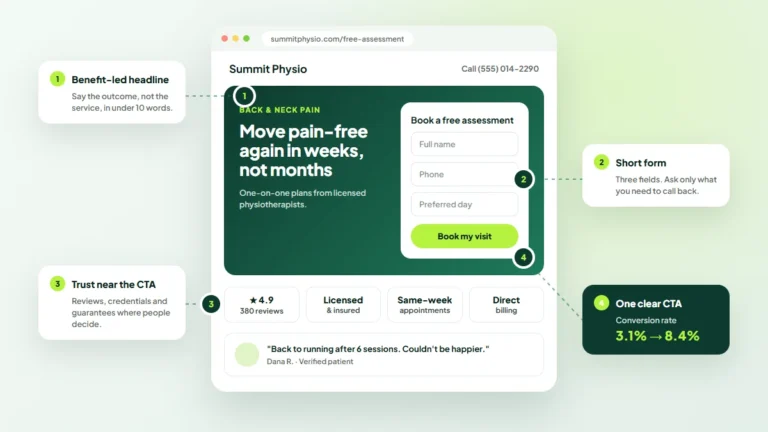
Send each ad group to the page that best answers that exact need, not just your homepage. A searcher looking for storm damage repair should land on a page about storm damage repair, with a visible form and phone number.
A focused landing page usually improves both conversion rate and ad relevance. For a closer look at building pages that convert paid traffic, read our guide to landing pages that convert.
Step 6: Check the Settings Most People Miss
- Networks: Search campaigns may include the Search Partners and Display networks by default. Review whether you want them before launch.
- Location options: choose “Presence” if you only want people physically in or regularly in your area, rather than people merely interested in it.
- Ad schedule: if you only answer calls during business hours, consider limiting call-focused ads to those hours.
- Bidding: start with a strategy that matches your data. Manual or maximize clicks can gather data early, then move to maximize conversions or target CPA once conversions flow in.
Common Account Structure Mistakes
- One campaign with every keyword the business could ever want.
- Ad groups with dozens of loosely related keywords sharing one generic ad.
- Brand and non-brand keywords mixed together.
- No conversion tracking, or tracking that counts page views as leads.
- Splitting so many campaigns that none of them gets enough budget to learn.
Frequently Asked Questions
How many keywords should be in an ad group?
There is no fixed number. Keep the group tight enough that one ad and one landing page fit every keyword; for many accounts that means a small, focused set rather than a long list.
Should I use Performance Max for lead generation?
It can work, but it relies heavily on accurate conversion data. Many advertisers find it easier to build a solid Search foundation first, then test Performance Max once they know what a quality lead looks like.
How often should I review my account?
Check spend and conversions weekly, and review search terms regularly. Structural changes, such as new campaigns, are best made monthly so each change has time to show results.
Get Your Google Ads Account Working Harder
A well-structured account will not fix a weak offer, but it gives every good offer a fair chance. For more guidance on bidding, budgets and tracking, browse our Google Ads articles, or see how the Twastia.io Google Ads management services handle it for you.
If you would like an expert review, request a free growth audit. Twastia.io will look at your campaign structure, tracking and wasted spend, then give you a clear, practical list of what to fix first.