Writing a strong blog post takes real effort. Yet many businesses publish an article, share it once and move on, leaving most of its value unused.
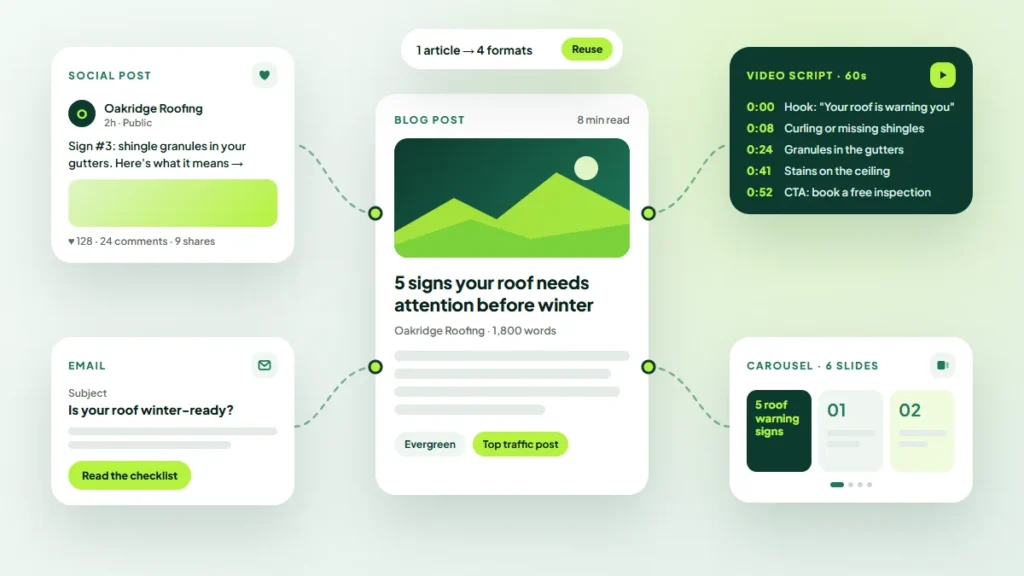
Repurposing turns one well-researched piece into many useful assets for email, social media, video and sales. This guide from Twastia.io shows how to repurpose blog content across every channel without making it feel repetitive.
Why Repurposing Works
Most people who could benefit from your article will never see it on your blog. They spend their time in their inbox, on social platforms or in conversations with your sales team.
Repurposing meets them there. It also saves time, because the research, structure and key points already exist. You are adapting proven ideas, not starting from a blank page.
Choose the Right Posts to Repurpose
Not every article deserves a second life. Start with content that already shows signs of value.
- Posts that bring steady organic traffic or rank for useful keywords.
- Articles that generated inquiries, replies or sign-ups.
- Guides that answer questions your customers ask often.
- Evergreen topics that will stay accurate for a long time.
Check your analytics and Search Console data, then make a short list of three to five candidates.
How to Repurpose Blog Content by Channel
Email Newsletter
Turn the article into a short email that shares one key insight and links to the full post. Or split a longer guide into a short email series, with one step per message.
Social Media Posts
One article can become several posts. Pull out a practical tip, a checklist or a common mistake, and write each as a standalone post for the platforms your customers use.
- Turn a list section into a carousel or image slides.
- Share one tip per post across a week or two.
- Pose a question from the article and invite replies.
Short Video and Audio
Record a short explainer that walks through the main idea, using the article’s headings as your outline. The same recording can become a social clip or a podcast segment.
Downloadable Resources
Checklists, templates and step-by-step guides work well as downloads. They can become lead magnets that collect email addresses in exchange for genuinely useful material.
Sales and Support Material
Give your team short summaries and links they can send when a common question comes up. A clear article can answer an objection faster and more consistently than a hurried email.
Presentations and Webinars
Expand a detailed guide into a slide deck for a webinar, workshop or industry event. The article gives you a tested structure and talking points.
Keep Quality and Consistency High
Repurposing is not copying and pasting. Each format has its own length, tone and expectations, so adapt the content to fit the channel.
Keep your voice consistent, though. Your audience should recognize your business in a video, an email or a social post. Clear brand guidelines for a small business make that much easier when several people create content.
A Note on Republishing Full Articles
If you republish a complete article on another site or platform, the copies can compete with your original in search. Where the platform allows it, link back to the original or use a canonical tag. Google’s guide to specifying a canonical URL explains how this works.
Build Repurposing Into Your Workflow
Repurposing works best when it is planned from the start, not added as an afterthought.
- Plan formats in advance. When you schedule a post, list the assets it will become.
- Write with repurposing in mind. Clear headings, lists and quotable lines are easier to adapt.
- Batch the work. Create social posts, email copy and graphics in one session after publishing.
- Space it out. Release assets over several weeks so the topic stays visible.
- Track results. Note which formats bring readers back to your site or generate inquiries.
If you do not have a plan yet, start with our guide to building a content calendar that drives leads, then add a repurposing column to it.
Common Repurposing Mistakes
- Posting the same text, word for word, on every channel.
- Repurposing weak or outdated posts instead of your strongest ones.
- Forgetting a clear next step, such as a link back to the full article.
- Producing so many formats that quality slips.
Key Takeaways
- Repurpose your best-performing, evergreen posts first.
- Adapt each piece to the format and audience of the channel.
- Keep your brand voice consistent everywhere.
- Plan repurposing in your content calendar and track what works.
Explore more ideas for planning and promoting content in our content marketing articles.
Get More From Every Piece of Content
Repurposing helps a small team do more with the content it already has. If you would like help planning and producing it, explore the content marketing services at Twastia.io.
Want to know which of your posts deserve a second life? Request a free growth audit, and Twastia.io will review your content and suggest where repurposing can add the most value.